Information
5 myths about repairing smartphones. — an informational article for technicians, service centers, and users, covering practical details related to choosing, using, and repairing electronics.
Phone repair attracts a lot of advice that sounds sensible and leads to bad decisions. Owners put off a service visit, charge a phone that is still wet or throw away a device that could have been fixed, while new technicians promise turnaround times they cannot keep. We picked five of these myths and checked them against manufacturer documentation and the EU rules in force in October 2026. General smartphone myths, such as closing background apps or overnight charging, have their own article on common smartphone myths. This one is only about repairs.
Myth 1: "Any repair will wipe my data"
Replacing a screen, battery, camera or charging port usually leaves the phone's storage alone. Your photos and apps stay where they were. The risk comes with board-level work, repairs that involve the memory chip or processor, and cases where the phone has to be reset or reflashed before it will boot.
"Usually" is still no guarantee. Before any service appointment, Apple recommends backing up the device and checking that iCloud sync is on. The same applies to Android phones: a backup to your Google account or a computer takes a few minutes and saves you from surprises. A good repair shop asks whether your data is backed up before starting work and writes down what was agreed on the intake form.
Myth 2: "It got wet but still turns on, so it's fine"
A phone that works right after contact with water can fail days or weeks later. Liquid trapped under components and inside connectors causes corrosion, especially if the phone is put on charge. Apple warns that charging an iPhone while the Lightning or USB-C port is wet can corrode the pins and cause permanent damage. Its advice is to unplug the cable and leave the phone to dry in a dry place with some airflow, with no external heat source and no compressed air. Apple also says not to put the phone in a bag of rice, because small particles of rice can get inside and damage it.
Water resistance is not a permanent condition. Gaskets and adhesive age, and after any repair that opens the housing, the seal depends on how well the phone was closed up again. Apple also states that liquid damage is not covered by its one-year limited warranty, although consumer law rights still apply. If the phone was in salt water or a sugary drink, or stayed wet for a long time, a diagnosis at a repair shop, with the board opened up and cleaned, is safer than waiting to see what happens.
Myth 3: "A battery swap takes five minutes, anyone can do it"
The lithium-ion battery is one of the most sensitive parts of a phone. On many models it is held in place with strong adhesive, and a battery that gets bent or punctured during removal can overheat and catch fire. Apple says explicitly that batteries should be replaced only by a trained technician, and that a non-genuine battery may be poorly made, previously used, damaged or wrong for the model.
Newer iPhones add one more detail. If the battery cannot be verified as genuine, the Parts and Service History screen in Settings shows an "Unknown Part" message, and battery health information may be inaccurate. The customer should hear about this before the repair, not after it. For the technician, doing the job properly means non-metal prying tools, disconnecting the battery before anything else and checking charging after assembly. The basic rules for handling batteries and power supplies are collected in our guide to safety rules for repair technicians.
 Plastic spatula Baku K-31,26 $›
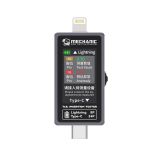 USB tester Mechanic T-82427,50 $›
A USB tester only shows what is happening on the charging line. It will not tell you the real capacity of the battery and it does not replace a full diagnosis, but it is handy for a quick check after replacing a battery or a charging port.
Myth 4: "Every repair takes an hour"
Swapping the screen or battery on a familiar model with the part already on the shelf can indeed be a short job. The real turnaround time is made up of several steps, though: diagnosis, ordering the part if it is out of stock, the repair itself, letting the adhesive cure where needed, and testing after assembly. With water-damaged phones, board faults or phones dropped from a height, the first diagnosis may uncover a second problem.
That is why a time quoted over the phone, before a technician has seen the device, is only an estimate. The more useful question for the customer is "when will I know what's wrong and how much it costs?" For the technician, a deadline given after diagnosis, with a realistic margin, keeps the customer's trust better than a one-hour promise that cannot be kept.
Myth 5: "New phones aren't worth repairing, parts disappear quickly"
In the European Union, the rules have shifted in favour of repair. Commission Regulation (EU) 2023/1670 on the ecodesign of smartphones has applied since 20 June 2025. For phones placed on the EU market after that date, manufacturers must make essential spare parts available to professional repairers for 7 years after the model stops being sold. Batteries must keep at least 80% of their original capacity after 800 charge cycles.
EU member states had to start applying Directive (EU) 2024/1799 on the repair of goods from 31 July 2026. If a product breaks down during the legal guarantee period and the consumer chooses repair over replacement, the legal guarantee is extended by one year. Manufacturers of the covered products, smartphones among them, may no longer use contract terms or hardware and software techniques that block repair without an objective justification. Outside the EU these rules do not apply directly, so check what your local consumer law says.
Whether a particular phone is worth fixing is still a case-by-case decision. Compare the repair cost with the overall condition of the device, how long it will keep getting system updates and the price of a comparable replacement. A clear quote that names the proposed part and the warranty on the work makes the comparison easy.
If you are just starting out in repair
The 2023 version of this article was written mainly for beginners, and one piece of advice from it still holds: you do not need a fully equipped workshop on day one. For disassembly and module swaps, a good screwdriver set, plastic opening tools, tweezers and an organised bench are enough. Expensive equipment can be added once there is demand for that service and you have had enough practice. We described the gadgets that make a repair bench easier to work at in our article on devices for a more convenient repair bench.
 Screwdriver set Mechanic iTech (48 in 1)out of stock›
Board-level work, micro-soldering and liquid damage repairs take practice on donor boards and, ideally, a mentor. Until then, it is fairer to the customer to say which jobs you do not take on yet than to learn on their phone.
Sources
- Apple Support, "If you see a liquid-detection alert on your iPhone" (support.apple.com/102643).
- Apple Support, "About genuine iPhone batteries" (support.apple.com/103269).
- Apple Support, "Prepare your iPhone or iPad for a service appointment" (support.apple.com/109519) and "Water and other liquid damage to iPhone or iPod isn't covered by warranty" (support.apple.com/109350).
- Commission Regulation (EU) 2023/1670 of 16 June 2023 (EUR-Lex) and the European Commission page "Smartphones and tablets".
- European Commission, "Directive on repair of goods" (Directive (EU) 2024/1799).

 UA
 RO





The information below is required for social login
Sign In
Create New Account