Information
Safety rules for the master. — an informational article for technicians, service centers, and users, covering practical details related to choosing, using, and repairing electronics.
The real hazards in a phone repair workshop are few, and they come up again and again: a damaged lithium-ion battery, solder fume, flammable solvents, electrostatic discharge and hot tools. The rules below deal with each of them in roughly the order you meet them during a normal working day.
We first published this article in July 2023 as a list of ten general rules. In October 2026 we rewrote it and checked the advice against specialist sources: guidance from the UK Health and Safety Executive (HSE), ESD Association material, the International Chemical Safety Card for isopropyl alcohol and iFixit's guide to swollen batteries. For the rules that legally apply to your workshop, follow your local occupational safety regulations and the equipment makers' instructions.
Before you open the device
- Power the phone off and unplug the charger. A switched-off phone still has a charged battery inside, so follow the service manual: on many models the battery connector is the first thing you disconnect.
- Look for signs of a swollen battery. A lifted display, a back cover that no longer sits flush or a case that flexes under light pressure means you need a different plan. Details are in the battery section below.
- Agree what happens to the data. If the repair touches the storage or the board, the customer should know in advance and make a backup. Customers often arrive with wrong ideas about what a repair involves, and our article on myths about smartphone repair covers the common ones.
- Find the procedure for the exact model. Disassembly order, screws of different lengths and flex cables glued under the battery all vary from one model to the next.
Lithium-ion batteries: the biggest fire risk
A lithium-ion battery that is punctured, bent or overheated can catch fire. iFixit's guide to swollen batteries gives a few simple rules:
- Do not charge a device with a swollen battery. If you can, run the battery down as far as possible before you start.
- Do not puncture or bend the battery while removing it. Use only plastic tools near it and soften the adhesive with a little solvent rather than forcing it. Remember that the solvent is flammable too.
- Wear eye protection and gloves. If the smell gets stronger, the device starts to heat up or you see smoke, stop and move the device into a fireproof container or outside.
- If the device is already very hot, smoking or smells strongly, do not try to remove the battery. Clear flammable material away from it and ventilate the room.
- A swollen battery must not be reused or thrown in the bin. Keep it in a fireproof container away from anything flammable, then take it to a battery or e-waste collection point.
Prepare a place in advance where you can quickly move a battery that is heating up: a metal tray, a metal bucket of sand or a concrete floor. Keep a fire extinguisher suitable for your premises within reach and check its service date.
Store new batteries and removed batteries separately, with their contacts covered, so they cannot short against each other or against metal tools.
Solder fume and lead
HSE names rosin-based solder flux fume as one of the top causes of occupational asthma among people who solder. Its advice is practical: use fume extraction, never overheat the soldering iron, keep your head out of the plume and maintain the extraction system regularly. How to choose an extractor and which filters to look for is covered in our article on the microscope, fume extractor and battery programmer.
If you use leaded solder, the main risk is swallowing it. Lead gets into the body when you eat, drink or smoke without washing your hands first. HSE's rules for working with lead are clear:
- do not eat or drink at the workbench;
- wash your hands and face before breaks and before you go home;
- clean up solder and flux residue at the end of the day.
ESD protection: grounding matters more than the mat
A static discharge too small for you to feel can still damage a sensitive component. The ESD Association describes the basic principle: the person, the work surface and the tools must be brought to the same potential by bonding them to a common grounding point. An antistatic mat that is not connected to anything, or antistatic gloves worn without a wrist strap, do not create that connection.
- Connect the work mat to the common grounding point as its instructions describe.
- Wear a wrist strap connected to the same point when you work seated at the bench. The strap's cord usually contains a 1 megohm resistor that limits current for your own safety. Never replace the cord with a plain wire.
- Keep plastic bags, bubble wrap and disposable cups away from the board. Insulators cannot lose their charge through grounding.
- Keep removed boards and components in antistatic packaging.
An antistatic mat covers the work surface. The one below is 100 cm wide, sold by the centimetre to fit your bench, and listed in the catalog as heat resistant:
 Desk mat (width 100 cm) Blue, antistatic, heat resistant (price per 1 cm)0,49 $›
Before you order, ask the seller how the mat connects to a grounding point and which accessories you need for that.
Solvents and cleaning fluids
Isopropyl alcohol is the most common solvent in a repair shop. International Chemical Safety Card ICSC 0554 classifies it as a highly flammable liquid with a flash point of about 12 °C. Its vapour mixes easily with air into explosive mixtures and is heavier than air, so it can collect in low spots around the bench. The same card warns that it causes serious eye irritation.
- Keep the bottle closed and away from the soldering iron, hot air and any open flame.
- Pour out only what you need, into a closed dispenser rather than an open cup.
- Keep fluids in their original, clearly labelled containers and read each product's safety data sheet.
- Wear safety glasses when you work with solvents, trim component leads or remove broken glass.
Which sprays and cleaning fluids are worth keeping on the bench, and what each is for, is covered in our guide to sprays and liquids for repair technicians.
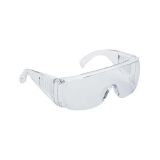 Transparent protective glasses for assembly and metalwork2,09 $›
Soldering iron, hot air and electrical equipment
- Put the soldering iron down only in its stand, never straight on the desk. Keep the stand away from paper, wipes and solvent bottles.
- Let the hot air nozzle cool in its holder before you touch it or put it away.
- Work at the lowest temperature that still gives a good joint. If the displayed temperature looks wrong, check the tip with a soldering iron thermometer.
- Read the manual for each device, including its protection class and operating conditions.
- Stop work at once if a cable is damaged, a device runs unusually hot or you feel even a slight shock. Have the device checked and repaired before using it again.
Order and focus at the bench
Most workshop incidents happen when someone is rushed or tired. A tidy bench helps: screws in an organiser, removed parts on a clean surface, equipment cables kept out of the work area. If you need to answer the phone or talk to a customer, put the iron in its stand and switch off the hot air first.
End-of-day checklist
- The soldering station, hot air and power supplies are switched off and unplugged.
- No battery is left charging unattended overnight.
- Damaged batteries are in the fireproof container, separate from good ones.
- Solvent bottles are closed and put away.
- Solder and flux residue is cleaned up and the bench is wiped down.
- The fume extractor filter has been checked, with a note if it needs replacing.

 UA
 RO





The information below is required for social login
Sign In
Create New Account