Useful information
TOP-3 equipment for more efficient and high-quality work. — a practical article with explanations and recommendations for technicians, service centers, and users. It highlights the main points to consider when choosing, using, or repairing devices.
A stereo microscope, solder fume extraction and a battery programmer each fix a different weak spot on a phone repair bench. The microscope shows you the fault, fume extraction keeps flux smoke out of your lungs, and the programmer tells you what state a battery is really in. None of them repairs a phone on its own, but each one replaces guesswork at a specific step of the job.
We first published this article in June 2023 as a short list of three devices. In October 2026 we rewrote it: the three categories stayed, the copied spec sheets and broad promises went, and we added buying criteria plus a simple way to check whether the equipment actually gets used.
Which one to buy first: start from the jobs on your bench
The right order depends on what comes through the door most often. A shop that mostly swaps screens and batteries has different priorities from one doing board-level repair. Look at your orders from the last two or three months and count how many needed soldering, how many were battery jobs and how many called for close inspection of the board.
| Equipment | What it solves | Buy it first if | How you know it is being used |
|---|
| Microscope | Board inspection, fine solder joints, corrosion, connectors | You do board repair or solder SMD parts | It is switched on for most diagnostics, not only for soldering |
| Fume extraction | Pulls flux fume away from your breathing zone | You solder every day, even a little | Smoke no longer rises toward your face; filters are changed on schedule |
| Battery programmer | Reads battery data and runs the operations the tool supports for that model | Batteries are a large share of your orders | Readings go into the job card before and after the swap |
If you solder daily, fume extraction should not wait. The other two can follow one at a time as your workload grows.
Microscope: inspection, diagnostics and precise soldering
Magnification reveals what the naked eye misses: a cracked solder joint, green corrosion next to a connector, a lifted pin, or a tiny component knocked out of place by a drop. During soldering, a microscope lets you work with tweezers and a fine tip without disturbing the parts next to the one you are replacing.
Phone repair benches usually run a stereo microscope, either binocular or trinocular. A trinocular head adds a third port for a camera, which is handy when you want to show a customer the damage or keep photos in the job record. The differences between types, working distance and useful zoom are covered in our guide on how to choose a microscope for phone repair.
When you compare models, check three things:
- Working distance. Tweezers, a soldering tip and a hot air nozzle all need to fit between the objective and the board.
- The stand. The image should stay steady when you bump the desk or rest your hand on it.
- Lighting. A ring light cuts shadows but can glare on shiny metal. Try it on a real board.
The original 2023 version of this article recommended a Mechanic MOS260 series binocular microscope, and it is still in the catalog:
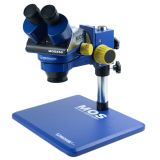 Binocular microscope Mechanic MOS260-B11 (6-45X) with R16 illumination286,27 $›
Current specifications and what comes in the box are listed on the product page.
Solder fume extraction
Most of the smoke you see while soldering comes from the flux. The UK Health and Safety Executive (HSE) names rosin-based solder flux fume as one of the top causes of occupational asthma. Its advice is to use fume extraction, never overheat the soldering iron and keep your head out of the plume.
A desk fan that just blows the smoke sideways does little, because the fume stays in the room. You need a filtered extractor placed close to the joint. HSE also notes that small bench-mounted units are of limited use unless they are fitted with a HEPA filter, so look at the filter stages when you choose, not only at airflow.
- Put the nozzle or arm as close to the joint as you can without it getting in your way.
- Check which filters the unit uses: a particle filter traps the smoke, activated carbon takes out some of the gases and odours.
- Replace filters as the manufacturer recommends. A clogged filter cuts suction even if the fan sounds the same.
- Keep the room ventilated as well. A local extractor does not replace general ventilation.
One example of a bench extractor: according to its catalog description, it has a 360° adjustable tube and multi-stage activated-carbon filtration. The description does not mention a HEPA filter, so keep the tube close to the joint and keep the room aired. If you solder heavily every day, HSE considers a ventilated soldering booth the best option, and a bench unit with a HEPA filter is preferable to one without.
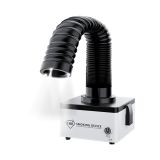 TBK 638 Mini fume hood with LED lighting (50W)out of stock›
Rules for soldering, solvents and batteries are collected in our article on safety rules for a phone repair workshop.
Battery programmer: clear data before and after a replacement
A battery programmer connects to the battery's protection board through an adapter made for that model. Depending on the tool, it can read voltage, current, cycle count and capacity, wake up a new battery that will not start, or run whatever other operations its maker lists for a given model. Supported models and functions vary between tools and change with adapters and firmware, so check the manufacturer's documentation before you buy.
iPhones add one more thing to know. Apple says that on iPhone XS, XR and later, the phone may show a message that it cannot verify the battery is a genuine Apple part, and battery health information may then be inaccurate. From the same models onward, Parts and Service History in Settings shows whether the battery was replaced and whether the part is genuine. Newer models list other parts as well. A programmer does not turn a non-genuine battery into a genuine one, and the customer should hear from you exactly what part they got.
A few working rules:
- Read the old battery's data before you remove it and note it on the job card, if the battery can still be read.
- After fitting the new battery, record voltage, cycle count and reported capacity again.
- Never present a reset cycle count as proof that a battery is new. Tell the customer which battery you fitted and what warranty it carries.
- Do not connect a swollen or damaged battery to the programmer. Take it out of service and store it separately.
When a customer asks why their battery wore out, our guide on whether fast charging affects battery life can help with the explanation.
The programmer featured in 2023 is still in the catalog. Confirm the supported models and adapters in the manufacturer's documentation or with the seller before ordering:
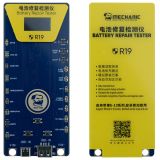 Mechanic R19 battery tester programmer22,10 $›
How to tell after a month whether it paid off
- Count the jobs where you used each device. If one sits idle, work out whether the problem is desk space, a missing adapter or a poor fit with your typical repairs.
- Compare warranty returns for solder joints and batteries with the period before.
- Check the extractor filters and write down when you changed them.
- See whether programmer readings and microscope photos actually end up in your job records.
When a device goes unused after a month, the cause is usually how the bench is organised. Move it closer to where you work and add the step to your intake or diagnostic routine.
The GSM-Forsage catalog has other microscopes, fume extractors and battery programmers too. Compare them against the repairs you do most often.

 UA
 RO





The information below is required for social login
Sign In
Create New Account