Information
Does fast charging affect smartphone battery life? — an informational article for technicians, service centers, and users, covering practical details related to choosing, using, and repairing electronics.
Short answer: fast charging does not mean the battery takes the charger's maximum rated power the whole time. The phone negotiates a compatible charging profile and adjusts power according to battery level, temperature and its own protection logic. What wears a battery out is mainly heat, time spent at a high state of charge, the battery's existing condition and the use of a charger and cable that suit the phone.
How fast charging works
The wattage printed on a charger is its maximum capability, not an amount of power it pushes into the phone. The phone, the charger and the cable all have to support a common protocol and profile. If one of them does not, charging may stay at a lower level, become unstable or not start at all.
Power also changes between 0 and 100%. The phone's charge controller adjusts it along the way and can reduce it as the battery nears full. That is why two chargers with different maximum ratings do not automatically produce a proportional difference in total charging time.
| Component | What to check | Warning sign |
|---|
| Phone | The protocol and limits the manufacturer lists for your exact model | Warning message, charging stops or keeps dropping out |
| Charger | Output profiles, port type and an undamaged housing | Smell, buzzing, damage or unusual heat |
| Cable | Connector types, rated specifications and contact condition | Cuts out when moved, hot connector or slow charging |
| Phone port | Clean, firm fit, no signs of liquid or corrosion | Loose plug, intermittent contact or a moisture alert |
What actually shortens battery life
Rechargeable batteries age chemically over time. Apple explains for iPhone that a battery's chemical age results from a combination of factors, including temperature history and charging pattern. The same page notes that a battery warms up as it charges, which can reduce its lifespan, and that iPhone gradually reduces the charging current as the battery approaches full charge. Apple also advises against using or charging an iPhone in ambient temperatures above 35°C (95°F), since that can permanently reduce battery lifespan.
These figures and behaviours come from Apple's iPhone documentation; they are not universal numbers for every smartphone. For an Android phone, check the maker's own guidance. Google's battery advice for Pixel phones, for example, includes keeping the phone cool and using Adaptive Battery and charging optimization. Which options exist and what they are called varies by model.
In practice, the number on the charger tells you little about risk by itself. What matters more is whether the phone gets hot repeatedly, how long it sits at 100%, whether it is under heavy load while charging and whether the accessories are in good condition.
How to choose a charger and cable
Before buying, check your phone's port, the charging protocol it supports and the manufacturer's recommendations. The products below are examples of accessories from our catalogue. They are not a universal kit and come with no promise of compatibility with every model.
USB Type-C charger
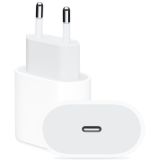 USB Type-C 20W Power Adapter (MHJE3)16,57 $›
USB Type-C to Type-C cable
 USB Type-C to Type-C cable for iPhone (1m)8,70 $›
A cable with the right plugs is not always enough; it also has to meet the requirements of the charging profile. If charging cuts out when you move the cable, the connector gets unusually hot or the phone shows warnings, stop and test each part separately with alternatives you know work.
How to avoid unnecessary heat
- Use a charger and cable that suit your phone model and show no visible damage.
- Charge on an open, well-ventilated surface, away from direct sun and heat sources. Do not cover the phone with a pillow or blanket.
- Leave the manufacturer's optimised charging features on if your phone has them and they fit the way you use it.
- Avoid long, demanding tasks such as gaming or high-resolution video recording while charging, especially if the phone is getting noticeably warm.
- Do not drain the battery to zero on purpose to "train" it. If you use the 80% limit on a Pixel, Google says the phone still needs a full charge every 10th cycle to keep its battery capacity readings accurate; follow the instructions for your model.
- If charging pauses because of temperature, unplug the phone and let it return to normal temperature gradually. Do not put it in the fridge or on ice.
The idea that a battery needs full discharges is one of many outdated tips; our article that debunks common smartphone myths covers more of them.
When a diagnosis is needed
A repair shop check makes sense if charging keeps cutting out, the port is loose or shows corrosion, the phone or connector gets unusually hot, battery life drops suddenly, you notice an odd smell or the case starts to bulge. Do not charge or press on a swollen or damaged battery. For handling and bench setup, see our safety rules for repair technicians.
A USB tester can show voltage, current and other values within the limits of the meter you use, but a single reading does not establish battery health. Interpreting it properly needs context: the phone model, charge level, negotiated protocol, temperature and behaviour under load.
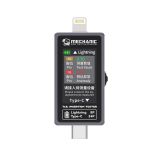 USB tester Mechanic T-82427,50 $›
If repairability and battery replacement matter when you pick your next phone, our guide to the most repairable smartphones explains what to look for before you buy.
FAQ
Does a more powerful charger automatically push maximum power into the phone?
No. The phone and charger agree on a shared profile, and the phone regulates power within the limits it accepts. The charger and cable still need to be compatible and in good condition.
Is slow charging always better for the battery?
It cannot be judged in isolation. Temperature, time spent at a high charge level, battery condition and the phone's own charging algorithms all affect the outcome. Follow your phone maker's recommendations.
Can a USB tester tell me battery health on its own?
No. A tester gives useful measurements for diagnosis, but they need to be read alongside system data, the phone's behaviour and other technical checks.
Summary
Fast charging is a process the phone controls, not a charger forcing its maximum power into the battery nonstop. Choose compatible accessories, avoid heat build-up, keep the manufacturer's charging optimisations on and stop charging if you notice dropouts, swelling or unusual heat. For exact limits and options, your phone's own documentation remains the main reference.

 UA
 RO




The information below is required for social login
Sign In
Create New Account