Useful information
Display quality classes: what you need to know? — a practical article with explanations and recommendations for technicians, service centers, and users. It highlights the main points to consider when choosing, using, or repairing devices.
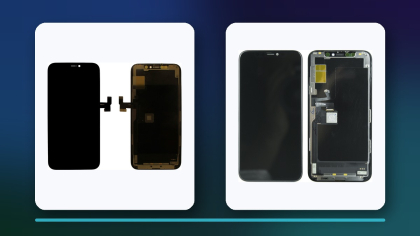
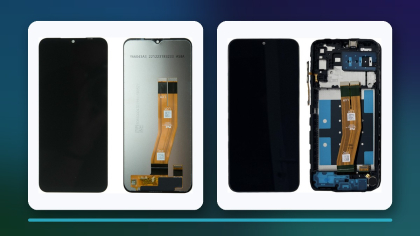
Shop for a replacement phone screen and you will see labels like Original, OR, Original PRC, Service Pack, OLED, In-Cell, High Copy or AAA. They are not an international quality scale. Some describe where the part supposedly came from or how it reached the seller, some describe the display technology, and some are simply a supplier's own sales categories. So the right screen is picked by the exact phone model, the technology, what comes in the kit, which features keep working, and a test before you glue anything in.
This article first went up in September 2023 as a list of "classes" presented as if they were a standard. We rewrote it in October 2026: origin and technology are now treated separately, claims that cannot be checked (for example, that a copy is no different from the original) are gone, and there is a checking routine you can use with any supplier.
Why the label alone tells you little
Two shops can give different names to modules that are almost the same, and two modules sold under one name can differ in the panel maker, touch layer, driver IC, frame and flex cable revision. A label is useful for filtering a catalogue, but it does not replace the description of the specific part.
Check separately whether the screen comes with a frame and whether it keeps the features your customer relies on: refresh rate, auto-brightness, the proximity sensor and an under-display fingerprint reader. All of these depend on the phone model, how the part is built and how it is fitted.
Origin, technology and kit contents are three different questions
| Label | What it usually means | What to ask the supplier |
|---|
| Service Pack | A service kit sold as coming from the phone maker or through its parts channel | Who made it, what is in the kit, which region it is for and what warranty applies |
| Original / OR / Original PRC | The claimed origin of the component; the exact meaning varies between suppliers | What exactly is original: the whole module, only the panel, only the touch layer, or a refurbished part |
| REF / refurbished | A rebuilt module in which some parts may have been replaced, often the glass | What was kept, what was replaced and who did the refurbishing |
| OLED | The panel technology: every pixel emits its own light | Origin, type of OLED, frame, supported features and driver IC |
| In-Cell | An LCD with the touch electrodes built into the panel layers | Compatibility, brightness, thickness, frame and which features still work |
| High Copy, AAA and similar | A commercial grade assigned by the supplier | The actual specifications and the criteria behind the grade |
The products below show how these labels appear in real catalogue names. They are here to illustrate the terminology, not as a recommendation for any particular model, and compatibility is always checked against the exact model number of the phone. Tags such as H/C or REPART in a product name are supplier labels too, so ask what they mean for that specific part.
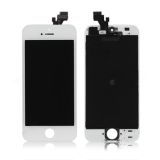 Display iPhone 5 White OR7,01 $›
 Display iPhone XR Black H/C INCELL11,79 $›
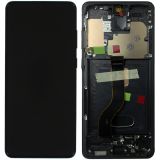 Display Samsung Galaxy S20 Plus OLED with frame Black (REPART)75,00 $›
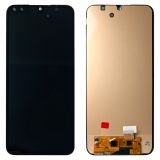 Display Samsung Galaxy A16 / A16 5G OLED Black40,67 $›
OLED vs In-Cell: what changes with the technology
If the phone left the factory with an OLED screen, an In-Cell replacement is a backlit LCD. The picture looks different: blacks are no longer truly black, contrast drops, and the module can be thicker. On some models a thicker screen affects how the housing closes or where the sensors sit. For a customer who wants the cheapest repair, In-Cell can be a reasonable choice, as long as they know in advance what they are getting.
iPhones add one more factor. On its support page about genuine iPhone displays, Apple says a non-genuine display may cause Multi-Touch problems, lower maximum brightness, incorrect color calibration and issues with True Tone or the ambient light sensor. On iPhone 11 and later (excluding iPhone SE 2nd and 3rd generation), Settings, General, About shows Parts and Service History once the phone has been repaired, and a non-genuine display can appear there with an "Unknown" message. The customer should hear about this before the repair, not afterwards.
How to compare screens for the same model
- Confirm the full phone model, the regional version and, where it matters, the board or flex revision.
- Compare the new screen's technology with the factory one and agree with the customer whether the alternative is acceptable.
- Find out what is in the kit: frame, touch layer, small parts, adhesive and protective films.
- Check that refresh rate, sensors, the fingerprint reader and other model-specific features are kept.
- Compare the supplier's warranty terms and its rules for testing before installation.
What makes a phone easier or harder to fix, including how easy it is to get parts, is covered in our separate article on the most repairable smartphones.
Testing the picture and touch before you fit the screen
Test the screen while it is connected to the board, before gluing, before peeling off the shipping films and before final assembly. If something is wrong, the part can still go back to the supplier in the condition it arrived in.
For the picture, look at brightness, backlight uniformity, contrast, white tint, behaviour at low brightness, viewing angles, lines and visible flicker. For touch, check accuracy across the whole surface and along the edges, multi-finger input and the absence of ghost touches. Then check the proximity sensor during a call, auto-brightness and, where fitted, the fingerprint reader.
Fitting a screen needs a clean bench with a phone holder, a heat-resistant mat and, for some models, a UV lamp for the adhesive. How to choose and arrange that equipment is described in our guide to devices that make a repair bench easier to work at.
What to tell the customer
Many disputes start with the promise that a part is "just like the original". Tell the customer which type of screen you are fitting, what differences they might notice and what the warranty covers. If the phone had OLED and is getting In-Cell, mention the difference in contrast and picture. On an iPhone, warn them about the message in Parts and Service History. An informed customer accepts the trade-off more easily and comes back with complaints less often. Other common misconceptions about repairs, such as the idea that any repair wipes your data, are dealt with in our article on myths about smartphone repair.
Quick checklist
- The phone's model and model number match the part description.
- You know the new screen's technology and how it compares with the factory screen.
- You know whether the part comes with a frame and what else is in the kit.
- Picture, touch and sensors were tested before gluing.
- The customer knows what type of screen they are getting and what the warranty covers.

 UA
 RO





The information below is required for social login
Sign In
Create New Account